Trust Wallet Security Alert: Guide on Browser Extension Hack
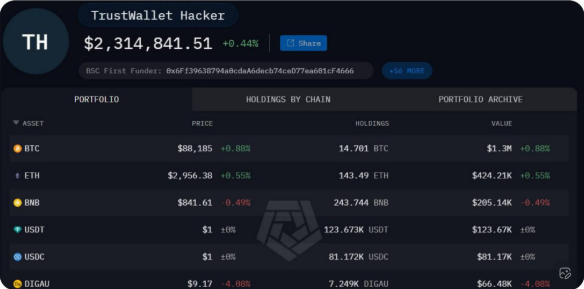
Trust Wallet has confirmed a targeted security flaw in its browser extension version 2.68, warning users to disable the affected version and update immediately. The incident led to more than $6 million in drained funds, including Bitcoin (BTC), Ethereum (ETH), and Solana (SOL), according to details shared by the company and community reports.
The wallet provider stressed that the issue was limited to the desktop browser extension v2.68 only. It mobile applications and all other extension versions were not affected, helping contain the impact.
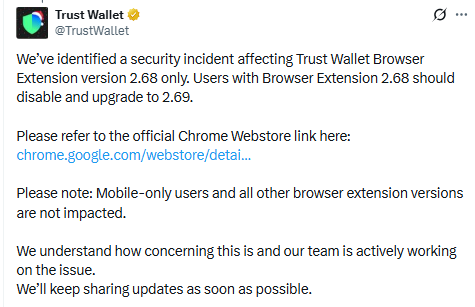
Source: Official X Account
What Happened
It said it identified a security incident linked to browser version 2.68. The flaw allowed attackers to access wallets in a targeted way. Early analysis suggests the incident may have come from a supply chain attack, where malicious code reached users through the extension update process. A supply chain attack means harmful code enters software through a trusted update or tool.
Because the issue was version-specific, only users who installed or ran v2.68 were at risk. The company acted quickly to warn users and released version 2.69 as a secure update.
Assets Affected and Scale of Loss
Community tracking and reports linked the incident to losses of over $6 million. The stolen assets reportedly included major cryptocurrencies such as BTC, ETH, and SOL. Trust Wallet did not say that every v2.68 user was hit, noting that the attack appeared targeted, not mass-wide.
This detail matters. It shows the problem was not a full system failure but a focused exploit tied to a single extension version.
Clear Steps Shared With Users
It published step-by-step guidance to protect users and prevent further issues. The instructions were shared publicly and repeatedly:
Do not open the Trust Wallet browser extension on desktop if it is still v2.68
Go to Chrome’s Extensions panel
Turn off the Trust Wallet extension
Enable Developer mode
Click Update
Confirm the version number is 2.69, which is safe
The company also shared the official Chrome Web Store link to avoid fake downloads.
Mobile Users Are Safe
Trust Wallet was clear that mobile-only users are not impacted. The issue did not affect the iOS or Android apps, and no action is needed for users who never used the desktop browser extension.
This helped reduce panic, as a large part of Trust Wallet user base relies on mobile access.
User Reaction and Compensation
After the disclosure, some users voiced anger and concern online, asking about compensation for lost funds. It support teams are reportedly handling reimbursement cases, reviewing claims tied to the affected version.
In a separate response, Changpeng Zhao, also known as CZ, confirmed that affected It would be covered through Binance’s SAFU fund. This assurance helped calm fears and added confidence that losses would be addressed.
Reimbursement reviews may vary by individual case, and they are advised to contact official support for confirmation.
Trust Wallet also stated that its customer support team is already in touch with affected users to guide them on next steps. It has been advised to contact support only through official channels.
Timing and Response
The incident happened on Christmas Day 2025, a time when market activity is often lower and teams are smaller. Even so, It issued alerts quickly, pushed a fixed version, and shared clear instructions.
Security experts say this fast response likely helped stop wider damage and showed the value of rapid disclosure in crypto security events.
Why This Matters
Browser extensions are widely used to connect to Web3 apps, sign transactions, and manage assets. This event highlights a key lesson for crypto utilizers:
Always keep It software updated
Avoid opening wallets when a warning is active
Download updates only from official sources
Act fast when trusted teams issue alerts
Even The tools can face risks, especially through supply chain attacks. User awareness and fast action are critical.
General Wallet Safety Tips
- Keep apps and extensions updated
Use official download links only
Avoid opening during active alerts
Review permissions regularly
Final Take
The browser extension flaw was serious, but it was limited in scope and quickly addressed. With mobile apps unaffected, a secure update released, and compensation support confirmed, the incident now stands as a reminder of why updates and official guidance matter in crypto.
people who follow the update steps and stay alert can reduce risk and keep their digital assets safe.
PRECAUTION: Avoid using the extension until the official fix is confirmed.